

Whether you run a small eCommerce store or manage a large IT system, you’ve probably heard about PCI DSS , the global standard for handling cardholder data securely.
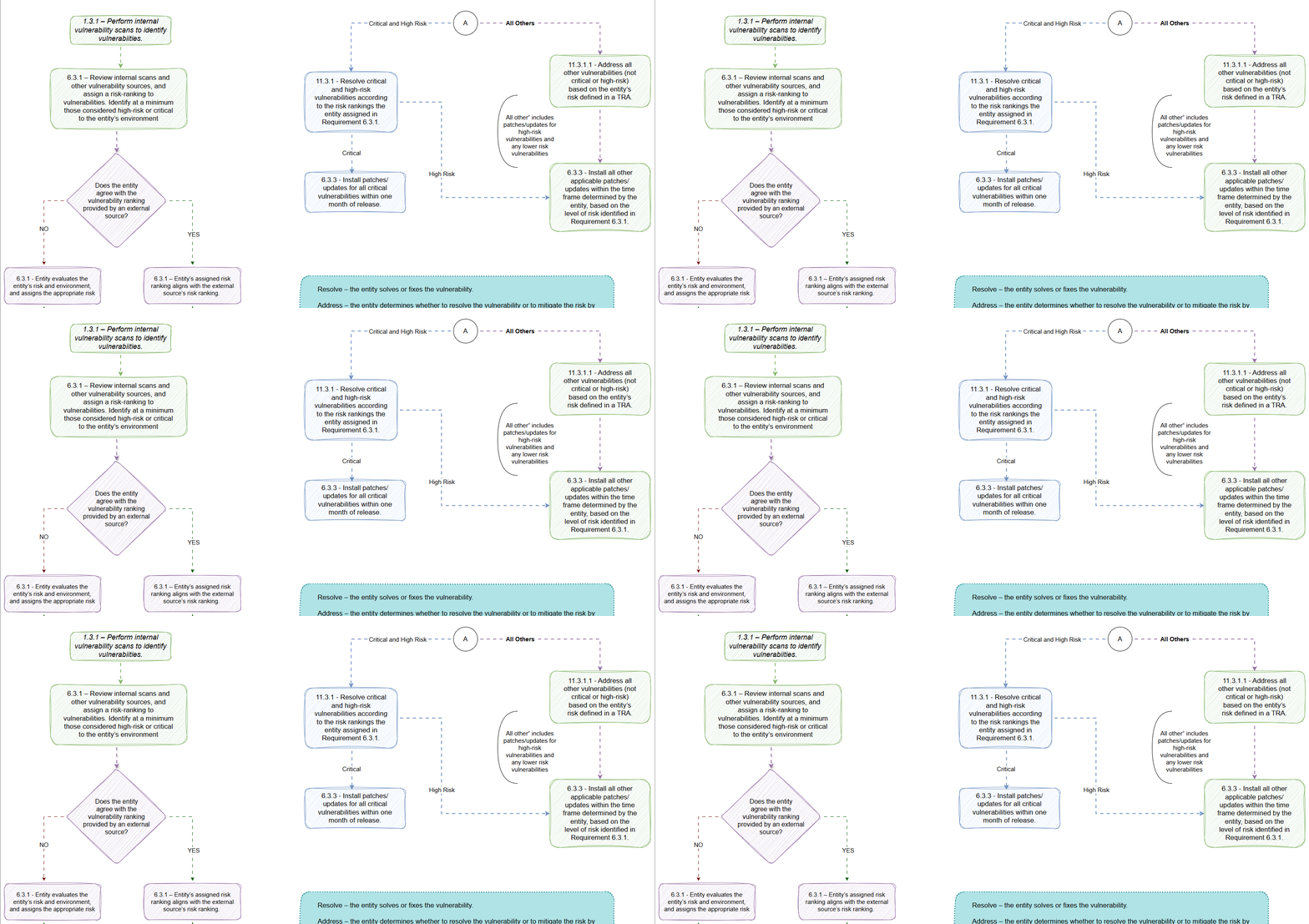
One of the most important (yet confusing) parts of PCI DSS is the requirement to identify and fix vulnerabilities in your systems. The PCI Security Standards Council recently released an infographic and FAQ to help businesses understand this process better.
We’ve broken it down into plain English so you don’t need to be a cybersecurity expert to follow along.
What is a Vulnerability?
A vulnerability is a weakness in your system that could be exploited by hackers. It could be anything from outdated software to misconfigured security settings.
What Does PCI DSS Require You to Do?
PCI DSS says you must:
- Identify vulnerabilities in your system.
- Rank them based on how dangerous they are (called “risk ranking”).
- Fix them within a set amount of time, depending on how risky they are.
Simple? Let’s go deeper.
Step 1: How Do You Find Vulnerabilities?
You do this through internal scans kind of like a health check for your IT systems.
- These scans can be done using automated tools.
- They show where your systems are weak.
- You must do this regularly to stay compliant.
Step 2: How Do You Rank the Risks?
Not all vulnerabilities are equal. PCI DSS wants you to rank them as:
- Critical
- High-risk
- Medium-risk
- Low-risk
You can use external tools that give you these rankings automatically but here’s the catch:
You must decide if you agree with the rankings based on your own business context.
If you don’t agree, you can change it but you have to document why.
Example:
Let’s say a tool marks something as “high-risk,” but you know it’s not exposed to the internet and poses less risk. You can downgrade it with a good reason.
Step 3: How Fast Should You Fix These Issues?
Here’s what PCI DSS expects:
| Risk Level | Action Required |
|---|---|
| Critical | Fix within 30 days |
| High | Fix within a reasonable time (based on your risk policy) |
| Others | Also fix but the time frame depends on your risk analysis |
You can fix or mitigate (reduce the risk in another way, like disabling the affected service). But ignoring it? That’s not allowed.
What if You’re Using an External Vendor?
Great question. You can use third-party scanners, but your company is still responsible for:
- Reviewing the results
- Deciding the actual risk ranking
- Acting on the findings
Even if a scanner says “low risk,” if your system is exposed to the public, you may need to treat it as higher risk.
Key Takeaways for Business Owners
- You must take ownership of vulnerability rankings don’t blindly rely on tools.
- Document your decisions about risk rankings (especially if you override them).
- Have a patch plan critical issues must be resolved within a month.
- Vulnerability management is ongoing, not a one-time task.
Final Thoughts
Vulnerability management may sound technical, but it’s really about keeping your business safe and trustworthy.
By following these steps and aligning with PCI DSS, you show your customers and partners that you care about their data.
Want to see the official visual breakdown?
Check out this PCI DSS Infographic on Vulnerability Management
Have questions or need help building your vulnerability management process? Drop them in the comments below!
Product Data & Everything
Make a one-time donation
Make a monthly donation
Make a yearly donation
Choose an amount
Your contribution is appreciated.
Your contribution is appreciated.
Your contribution is appreciated.
DonateDonate monthlyDonate yearly
 Product Data & Everything